 SEO strategy
For ecommerce SEO teams, learn how to qualify page patterns, map product data, build useful templates, control crawling, and validate a pilot before scaling.
12 min read

Large online catalogs contain thousands of attribute combinations, yet only a fraction deserve their own search landing pages. Learning how to build programmatic SEO pages from ecommerce product data starts with treating page generation as a publishing decision. Reusable templates let your team scale production, while strict selection rules keep thin, duplicated, and outdated URLs out of search indexes.
Catalog-driven landing pages serve a distinct role on an online store. They group products around a specific buyer search, such as a material, fit, or compatibility requirement. Individual product detail pages focus on one item, and editorial articles answer broader research questions.
We walk through five stages in this guide. You will select qualified query patterns, normalize catalog fields, and design templates that help shoppers compare options. You will also separate indexable landing pages from ordinary store filters and validate a limited launch before expanding.
Article summary
Start every programmatic page project with buyer intent and real inventory. A catalog can generate tens of thousands of attribute pairs, so your team needs a filter that admits only meaningful combinations.
Before creating URLs, run each candidate pattern through four selection checks. A structured programmatic keyword clustering workflow helps you group overlapping search phrases before you assign them to templates.
Search intent determines whether a catalog landing page can satisfy the shopper. Commercial comparison queries call for a browsable grid of matching products. Specific model lookups belong on a single product detail page, and open-ended how-to questions belong in an editorial guide.
Careful mapping of search intent to templates prevents your store from forcing a product grid onto an informational query. Review the top ranking pages for a sample query from each pattern. Notice whether search engines show category grids, individual listings, or written tutorials.
For an illustrative example, consider a footwear retailer reviewing two search patterns. Shoppers searching for waterproof hiking boots want to compare several models, so an attribute landing page fits. Shoppers searching for how to clean suede boots want care instructions, so a catalog grid will disappoint them. Verify the dominant result format before writing a single template rule.
Every approved pattern needs a written publish gate before engineering builds the URL rule. A publish gate records the shopper task, the exact catalog fields that populate the page, and the distinct guidance the page adds. It keeps low-value combinations out of the index from day one.
We recommend defining a clear minimum assortment rule for each category based on how shoppers compare those goods. A specialty replacement part page may help buyers with three compatible options, while an apparel color page usually needs a broader selection. Setting rules up front saves your team from later auditing thin programmatic pages after index bloat has already appeared.
Document one rejection rule alongside every approval rule. If a brand carries only one product in a subcategory, hold that brand-and-subcategory page back and let the product detail page rank. Hold weak combinations out of search until inventory supports a real comparison.
Reliable templates depend on clean, standardized product data. When teams plan how to build programmatic SEO pages from ecommerce product data, field consistency decides whether generated pages show accurate assortments or broken groupings.
Your product information management (PIM) system or store catalog holds the raw attributes that power both templates and product feeds. Each buyer modifier should map to one governed field with predictable values. The table below outlines six common catalog fields, their corresponding query patterns, and the primary shopper angle each page supports.
| Catalog field | Query pattern | Page angle |
|---|---|---|
| Category | [category] + [product] | Product range |
| Brand | [brand] + [category] | Brand assortment |
| Material | [material] + [product] | Material trade-offs |
| Size or fit | [size/fit] + [product] | Fit availability |
| Use case | [product] for [use] | Use-case selection |
| Compatibility | compatible [model] [product] | Compatibility check |
Aligning your internal schema with established ecommerce data standards keeps product records consistent across search channels. In Google Search Central's merchant listing structured data guidance, updated September 2026, Product.name, Product.image, and Product.offers are required properties, and an Offer requires the active price and its currency.
That same documentation lists brand.name, category, color, material, size, SKU, manufacturer part number, and GTIN among supported product attributes. It also recommends offer availability states including InStock, OutOfStock, and Discontinued. Maintaining these exact fields in your catalog makes filtering and availability rules far more dependable.
Field normalization works like giving the same shelf item one consistent label. Supplier feeds frequently mix capitalization, units, and phrasing for identical specifications. Without cleanup, your template generator splits one real product group across multiple competing URLs.
Consider a textile attribute where one vendor supplies cotton and another supplies 100% cotton. Establish a controlled vocabulary that maps both inputs to one canonical display value while preserving the original supplier value in a separate raw column. Keeping that raw column intact lets merchandisers audit feed updates without breaking live URL rules.
Apply the same discipline to missing values. Exclude incomplete records from attribute pages until a merchandiser fills the missing specification. Guessing an attribute from a vague title introduces inaccurate listings that erode shopper trust.
Shoppers rarely type internal database codes into a search bar. Your mapping layer translates natural buyer language into controlled catalog values. This keeps page headings readable while guaranteeing that every product in the grid matches the promise in the title.
Take an illustrative example from a kitchenware catalog. Buyers may search for induction-ready skillets, while the catalog stores a boolean compatibility flag for induction cooktops and a category value for frying pans. Mapping that search phrase to those two verified fields produces one accurate landing page.
Resist the temptation to spin up separate pages for every synonym shoppers type. Map synonyms to one canonical page when the underlying product set is identical. Using unverified text variations just to insert a new keyword into a title creates duplicate pages with no distinct inventory.
A reusable page template works like a physical product-display fixture. The underlying structure stays stable across the store, while the displayed items and buying details adapt to the shopper's specific task.
Strong programmatic landing pages go well beyond swapping a keyword token inside a boilerplate paragraph. Include these five core components in your page blueprint:
Each landing page should explain why the listed products qualify and which trade-offs matter when comparing them. A template can keep the layout uniform while pulling different specification columns and buying notes for each attribute family.
For an illustrative contrast inside an office furniture catalog, compare two attribute pages. A page for ergonomic mesh chairs should surface lumbar adjustment range, seat depth, and weight capacity in its comparison cards. A page for compact home-office desks should surface desktop width, cable routing, and leg clearance.
If every generated page shows the exact same three generic feature bullets, shoppers gain nothing from landing there. Tie specification cards to the query so the page answers the buyer's real decision criteria.
Teams frequently ask whether adding Schema.org Product markup to an attribute landing page will earn product rich results. Google Search Central's merchant listing structured data guidance states that merchant listing experiences apply to pages where a shopper can buy a product directly.
Product rich results support pages focused on a single product or its variants. Broad category lists and multi-product landing pages fall outside that scope. Reserve Product markup for purchase pages where the user completes a single-item selection.
Place Product and Offer structured data on the individual product detail pages linked from your grid. Do not wrap an entire multi-product landing page in a single product schema object in hopes of triggering a rich snippet.
Automation itself is acceptable in search, provided the output genuinely serves the user. Google Search Central's spam policies, updated August 2026 and currently in force, define scaled content abuse as generating many pages primarily to manipulate rankings with little or no user value, regardless of how the pages are produced.
That policy puts the burden on utility. When two generated pages display almost the same products and identical copy with only one swapped noun, they fail the usefulness test. Consolidating overlapping modifiers into one stronger page protects crawl equity and user experience.
Build quality checks directly into your template deployment workflow. Require distinct selection value per page through real product differences, verified specifications, and helpful buying notes.
Indexing control works like an invitation list. You deliberately invite search engines to crawl your curated landing pages while keeping millions of arbitrary filter states out of the crawl queue.
Coordinate these four technical decisions between your SEO team and developers before publishing templates at scale:
URL consistency helps search engines consolidate ranking signals. Google Search Central's ecommerce URL structure guidance, updated December 2025, recommends descriptive, persistent URLs and standard ?key=value parameters whenever query strings are used. Avoid duplicate parameters or temporary session values that generate multiple addresses for the same page.
Use the exact same URL format across internal links, XML sitemaps, and canonical tags. Place a self-referencing canonical tag on every indexable landing page so crawlers see one authoritative address.
Keep product variants distinct from catalog landing pages in your architecture. Google's URL guidance recommends giving each identifiable product variant its own URL while setting the main product URL as canonical when appropriate. A blue version of one jacket is a variant, whereas a curated page of blue rain jackets across multiple brands is a landing page.
Faceted navigation lets shoppers stack filters such as color, size, price range, and brand. According to Google Crawling Infrastructure's faceted navigation guidance, updated December 2025, parameter-based facets can create massive URL spaces that cause overcrawling and slow down the discovery of useful pages.
When filter combinations do not need to appear in Search, Google recommends blocking their crawling in robots.txt. The documentation notes that canonical tags and nofollow attributes are less effective over the long term for preventing crawl waste on large filter spaces.
For filter URLs that you deliberately allow crawlers to access, enforce three formatting rules. Keep parameter order consistent, prevent duplicate filters in one URL, and use & as the parameter separator. Return an HTTP 404 for empty filters directly under that URL. Google recommends serving a 404 response for filter combinations with zero matching products, duplicate parameters, or nonsensical pairings, avoiding redirects to a generic error page.
Search engines discover your approved landing pages primarily through links in your site architecture. Google Search Central's ecommerce site structure guidance, updated December 2025, recommends clear navigation paths from menus to categories, subcategories, and products using standard <a href> links. Googlebot generally does not submit queries into an on-site search box to find pages.
If parts of a large catalog are hard to reach through navigation menus alone, supplement your links with an XML sitemap or a Merchant Center feed. These routes give crawlers an additional path to locate new products and approved landing pages.
Rendering method also affects how reliably search engines read fast-changing prices and stock states. Google's merchant listing documentation warns that JavaScript-generated Product markup can make Shopping crawls less frequent and less reliable. Render product markup in initial HTML whenever your storefront platform supports server-side output.
A controlled rollout closes the loop when you build programmatic SEO pages from ecommerce product data across a live store. Releasing one narrow category slice first lets you catch template bugs, crawl blocks, and thin assortments before they multiply.
Follow these four validation steps during your initial release:
robots.txt blocks, noindex directives, or login walls.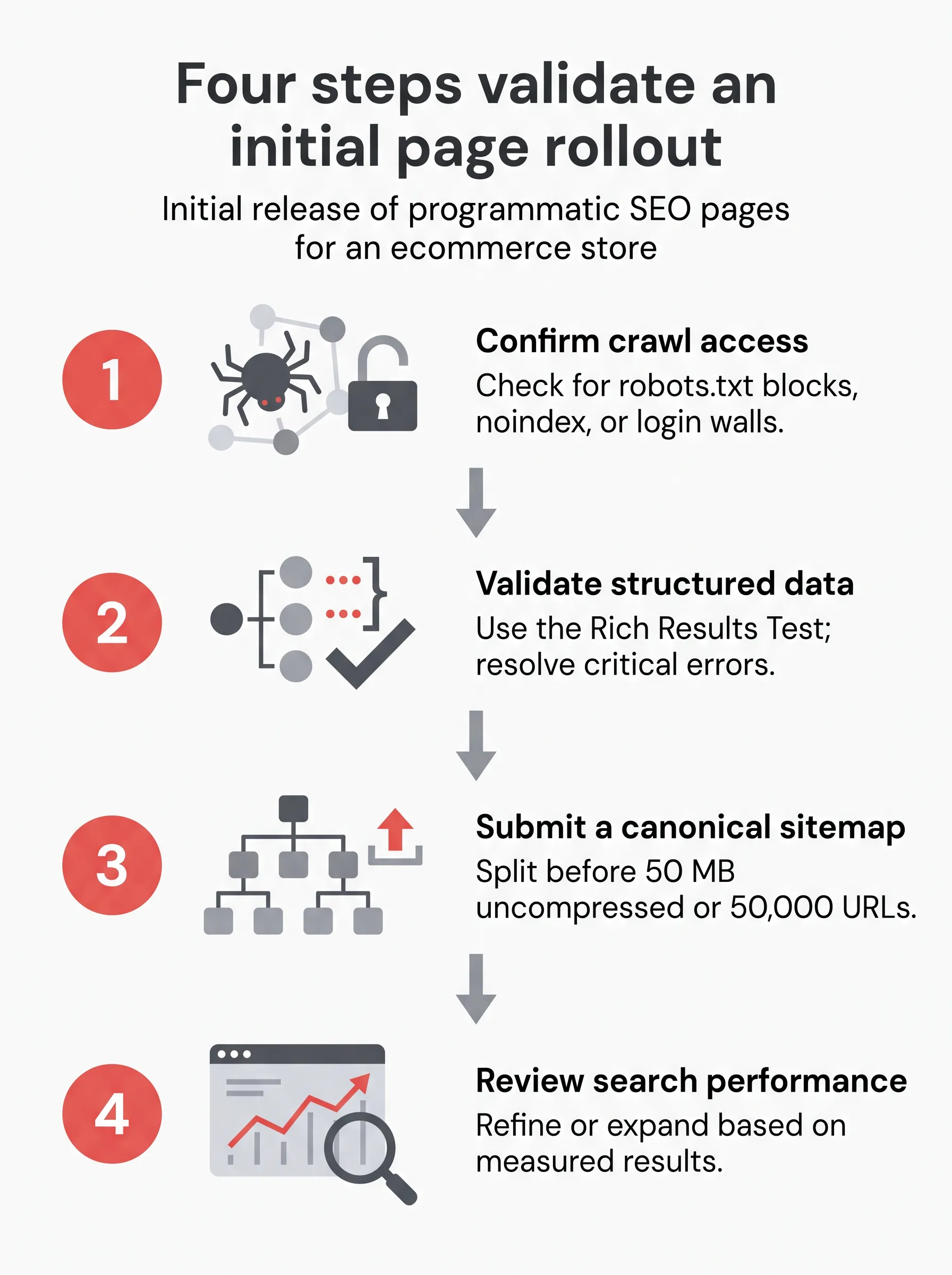
Treat pre-launch testing as an engineering gate. Google's merchant listing guidance recommends validating structured data, checking deployed pages with URL Inspection, verifying crawl access, and submitting a sitemap so Google learns about future catalog updates.
Sitemap hygiene matters when your store manages thousands of URLs. According to Google Search Central's sitemap documentation, updated July 2026, a sitemap should list only the canonical URLs you prefer for Search. Google uses the <lastmod> value when it is consistently and verifiably accurate, so update that timestamp only when page content or inventory meaningfully changes.
Keep in mind that submitting a sitemap acts as a hint to crawlers. Pair sitemaps with strong internal links because submission alone does not guarantee that Google will fetch every listed URL.
Publishing more pages does not prove that a template works. Google Search Console's Performance report groups search visibility by queries and pages, reporting clicks, impressions, click-through rate, and average position. Use those metrics to evaluate whether your initial landing pages attract qualified buyer searches.
Look for two concrete signals after your pilot set has been indexed. High impressions paired with low clicks suggest that page titles or product assortments miss the shopper's intent. Strong click-through rates on specific attribute families show where your catalog data can support another controlled wave of pages.
Your next step is straightforward. Pick one category for a pilot, map a single buyer-search pattern to its normalized catalog fields, and review one live landing page against your publish gate before extending the template across the store.
Programmatic SEO for ecommerce uses structured product-catalog data and reusable templates to create indexable landing pages for distinct buyer searches. Publish only combinations with a clear search purpose, matching products, and useful information; generating a URL alone does not make a page worthwhile.
For ecommerce product-filter URL patterns that should not appear in Google Search, Google's crawling guidance recommends disallowing their crawling in robots.txt. For filters that remain crawlable, keep filter order consistent and avoid duplicates; parameter-based facets can create large URL spaces, overcrawling, and slower discovery.
An ecommerce store should return HTTP 404 under the empty filter URL when no products match. Google recommends this for empty, duplicate, or nonsensical filter combinations rather than redirecting them to a common error URL.

